Operations ERP
Complete operations control center for support teams, dispatchers, technicians, and installers.
Operations ModuleOverview
The Operations ERP is the command center for day-to-day support operations. It equips your team to handle customer calls, manage service tickets, monitor charger health, and communicate with customers — all from one interface.
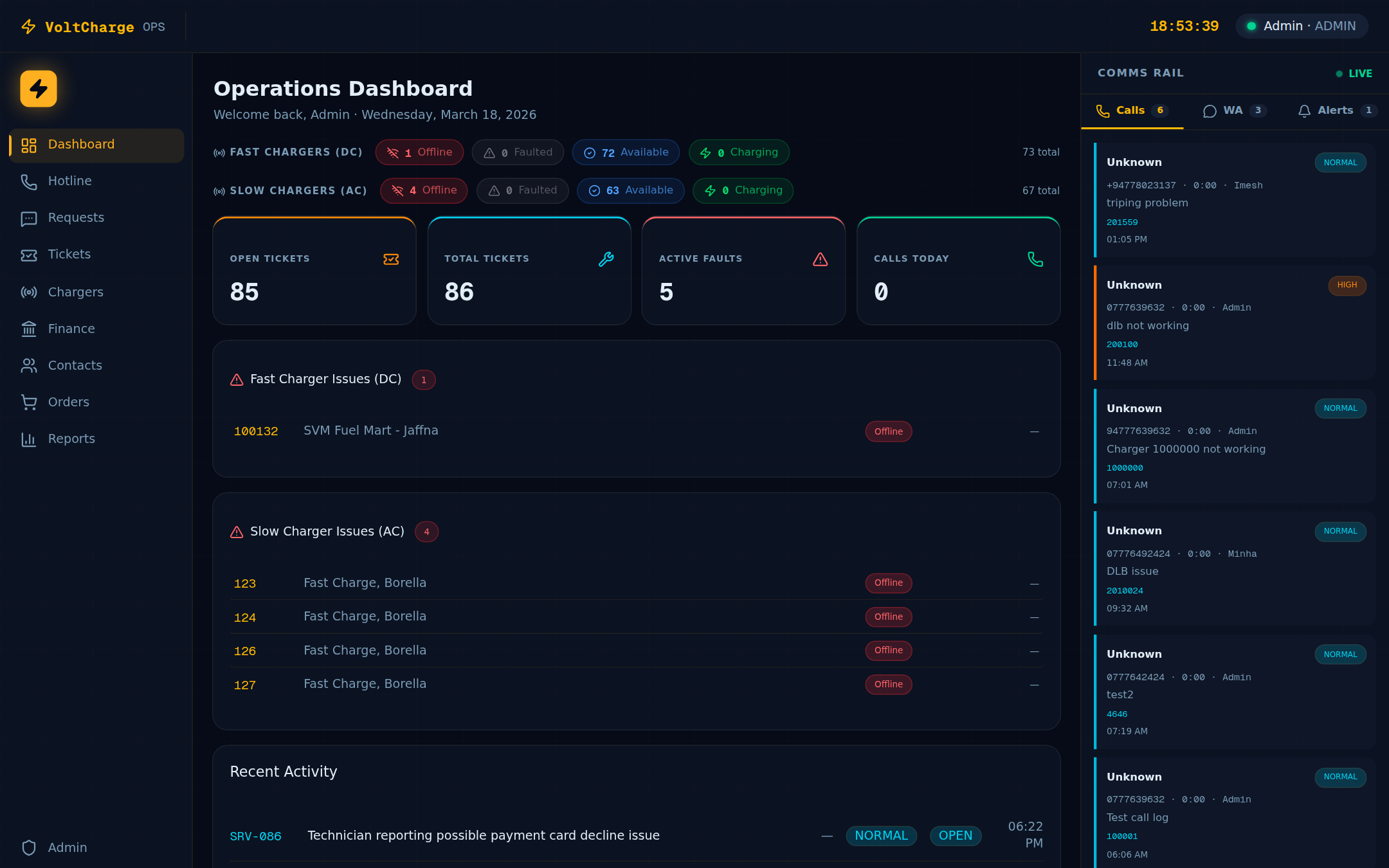
- Unified support dashboard — All operational metrics at a glance
- AI-powered automation — Intelligent message classification and routing
- WhatsApp integration — Customer and team communication via WhatsApp
- Remote charger control — MQTT-based remote commands for diagnostics and resets
Dashboard
Operational overview showing key metrics for team performance, call volume, ticket status, and charger health.
- Call volume metrics — Daily call counts by category with trend indicators
- Ticket statistics — Open, in-progress, and resolved ticket counts
- Charger health overview — Network-wide charger status summary
- Team performance — Per-agent activity and resolution metrics
Hotline & Call Management
Structured call logging system with 4 categories, caller identification, assignment tracking, and resolution workflows.
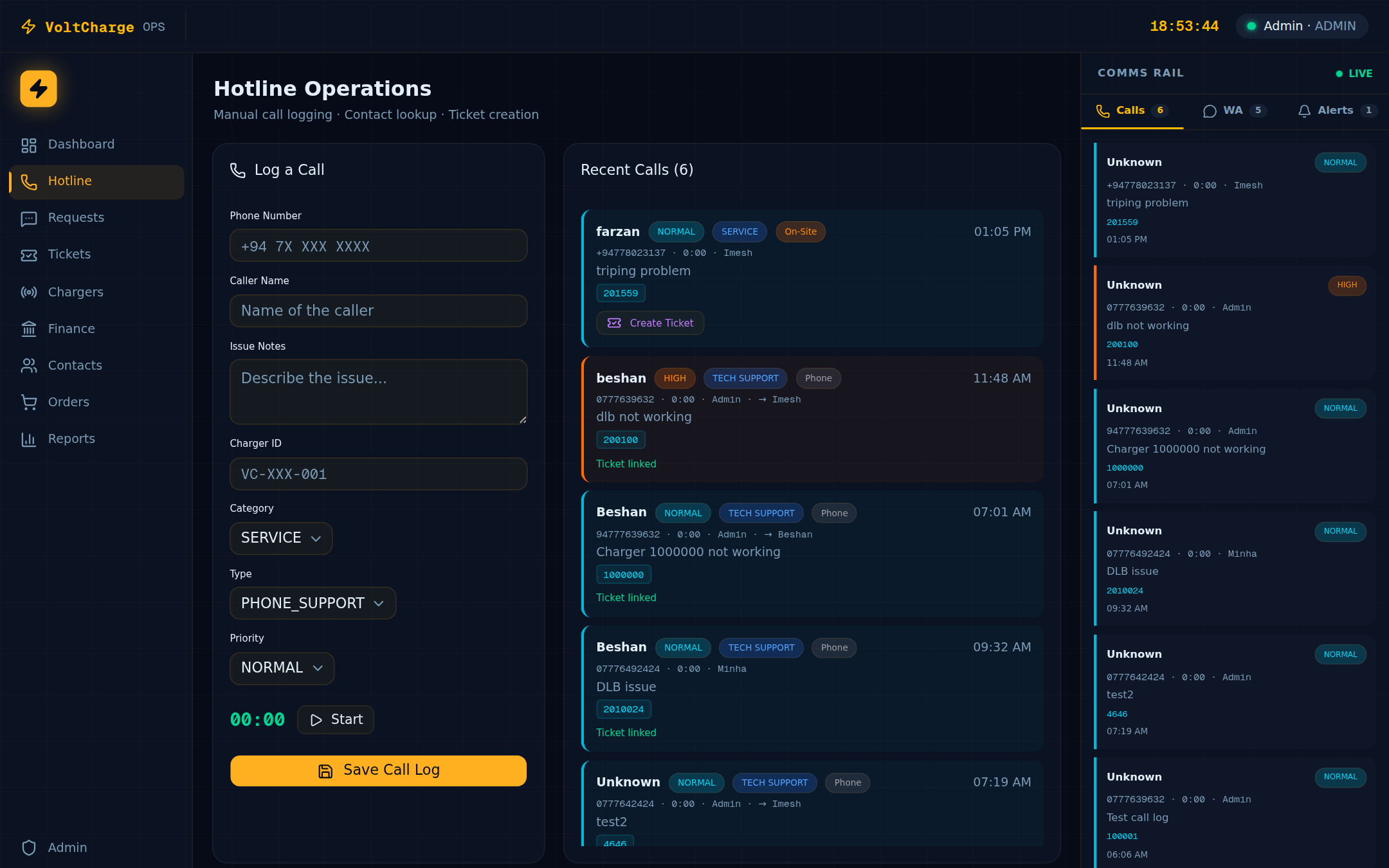
- 4 call categories — Payment Issues, Charger Faults, General Inquiry, Complaints
- Caller identification — Automatic customer lookup by phone number
- Call assignment — Route calls to appropriate team members
- Resolution tracking — Track call outcomes and resolution details
- Call history — Full history with search and filter capabilities
Ticket System
Priority-based ticket management with full lifecycle tracking from creation to resolution.
- Priority levels — Critical, High, Medium, Low
- Status workflow — Open → In Progress → Resolved → Closed
- Team assignment — Assign tickets to specific team members
- Ticket notes — Add notes and updates throughout the lifecycle
- Full history — Complete audit trail of all ticket changes
- Auto-creation from calls — Escalate calls to tickets with one click
Customer Requests
Incoming customer request queue with AI-powered classification and intelligent priority routing.
- Incoming request queue — Centralized inbox for all customer requests
- AI classification — Automatic categorization using Claude AI
- Priority routing — Intelligent assignment based on request type and urgency
Chargers Hub
Complete charger diagnostics and remote control center. Monitor status, send commands, and manage firmware updates.
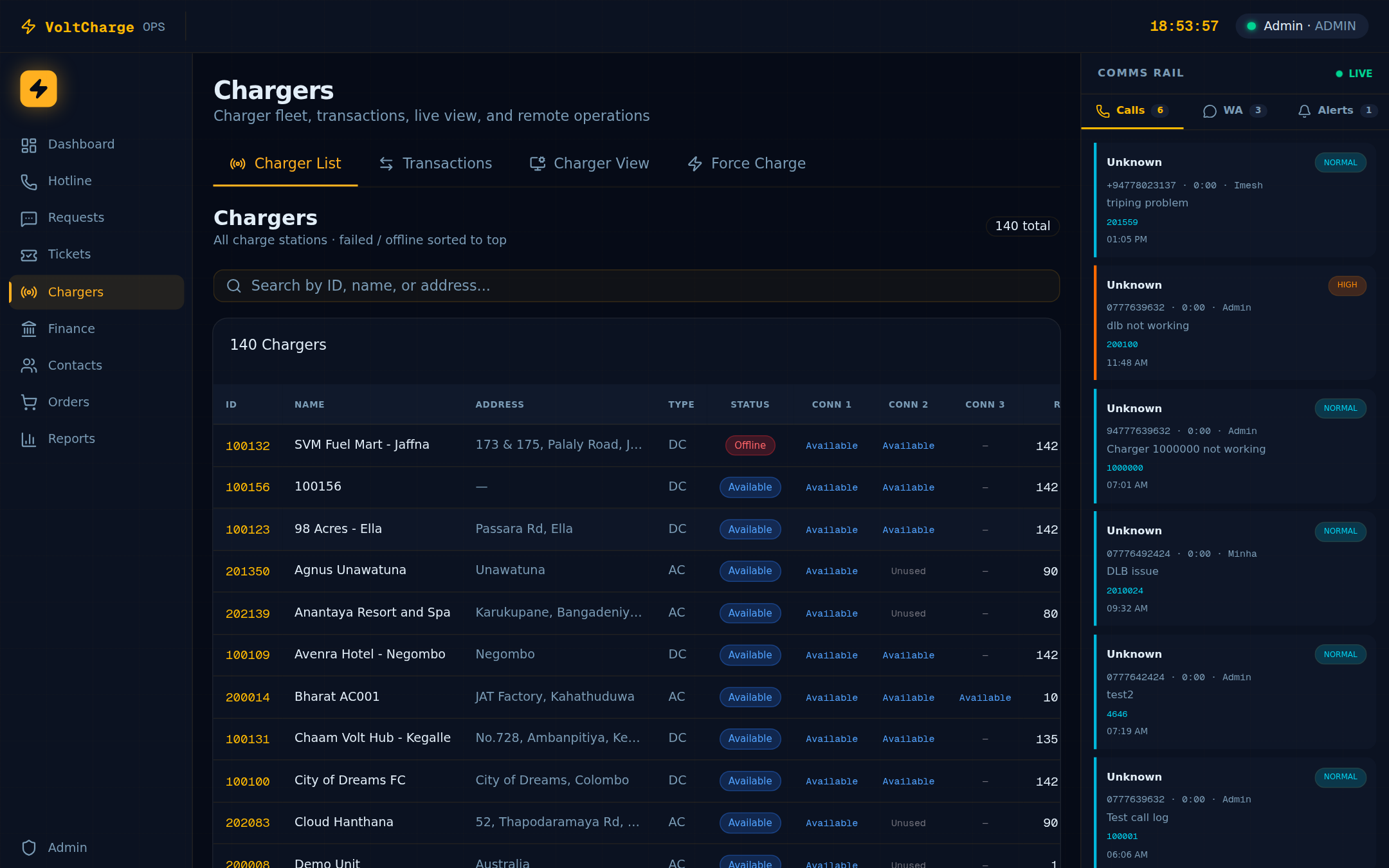
- Status monitoring — Real-time charger status across the entire network
- Remote commands — Reset, Start, Stop charging sessions via MQTT
- Firmware OTA — Over-the-air firmware management and deployment
- Charger diagnostics — Detailed charger health data and error logs
- Remote reboot — SSH-based server reboot capability for critical situations
WhatsApp Integration
Full WhatsApp business integration with incoming message inbox, AI-powered classification, and automated team notifications.
- Message inbox — All incoming WhatsApp messages in one place
- AI classification — Automatic message categorization via Claude AI
- Group notifications — Automated alerts to support team groups
- Media support — Handle images, documents, and voice messages
- Customer history — Full conversation history per customer
- Outbound messaging — Send messages and alerts to customers
Finance Module
Operational finance tools for support agents — quickly look up customer balances, payment history, and process manual top-ups.
- Balance lookup — Instant customer wallet balance search
- Payment history — All transactions across CyberSource, Amex, Dialog, and manual payments
- Manual top-up — Process manual wallet top-ups with receipt tracking
- Wallet audit trail — Complete audit log of all wallet transactions
Contacts
Comprehensive customer database with search, balance information, and per-customer transaction history.
- Customer database — Searchable directory of all customers
- Phone/email lookup — Quick search by phone number or email
- Per-customer history — Balance, transactions, and charging sessions per customer
Team Management
Department-based team organization with role assignments and capability management.
| Role | Description | Typical Responsibilities |
|---|---|---|
| Admin | System administrator | Full access, team management, configuration |
| Manager | Operations manager | Team oversight, reporting, escalations |
| Dispatcher | Call dispatcher | Call routing, ticket assignment, scheduling |
| Ops Agent | Operations agent | Call handling, ticket resolution, customer support |
| Installer | Field technician | Charger installation, maintenance, diagnostics |
| CPO | Charging Point Operator | Network monitoring, charger oversight |
- Department capabilities — Hotline, Service, Maintenance, Technical departments
- Activity tracking — Monitor team member activity and performance
Automated Monitoring
Proactive charger health monitoring with automated fault detection and instant team notifications.
- Scheduled health checks — Cron-based charger status monitoring at regular intervals
- Automatic fault detection — Detect chargers going Faulted or Offline
- WhatsApp alerts — Instant team notifications via WhatsApp group
- Alert history — Full log of all automated alerts and their resolution
- Reminder system — Automated follow-up reminders for unresolved issues
Support Mobile App
A dedicated Android app for field technicians and support agents. Provides real-time charger monitoring, OCPP debugging, remote charge control, and customer lookup — all from a mobile device. Authenticates against the Operations ERP user database.
Live Dashboard
Real-time charger network overview via MQTT. Displays L2/L3 split with status buckets — Available, Charging, Weak Signal, Offline, and Faulted — with search and filter.
Active Sessions
Live view of all ongoing charging sessions across the network. Subscribes to MQTT topics per charger for real-time energy, duration, and connector status updates.
Charger Map
Interactive map showing all charger locations with color-coded markers for DC (red) and AC (blue), and online/offline status indicators. Tap to open charger details.
OCPP Debug Console
Per-charger live OCPP debug stream showing status notifications, meter values, heartbeats, and command responses. Send remote commands directly from the console.
Charger Health Monitor
OCPP heartbeat analysis across all chargers. Shows online/offline counts, average heartbeat intervals, and identifies chargers with degraded connectivity.
Force Charge
Remote start or stop a charging session for any customer. Select charger, search customer, choose connector and charge mode (amount or time), then initiate the session.
Customer Lookup
Search customers by phone number. View wallet balance, charging session history, vehicle details, and profile information — all from the field.
Support Tickets
Create and manage ERP service tickets from the field. Filter by status (Open, In Progress, Resolved), add notes, and track resolution — synced with the Operations ERP.
- Issue Tracker — Assign, track, and resolve charger faults with priority levels (Low, Medium, High, Critical)
- Maintenance Planning — Schedule routine, repair, emergency, and inspection tasks with L2/L3 charger type filtering
- Push Notifications — Send broadcast messages and charger-specific alerts to mobile app users
- Alerts Feed — Real-time feed of charger offline events and system alerts with read/unread tracking
- Offline-capable — Local SQLite storage for issues and maintenance tasks when connectivity is limited
- ERP authentication — Uses Operations ERP credentials with role-based access control
| Navigation | Description |
|---|---|
| Dashboard | Real-time L2/L3 charger status overview with MQTT live data |
| Sessions | All active charging sessions with live energy and duration |
| Debug | Charger OCPP debug console + customer phone lookup |
| Map | Interactive charger location map with status markers |
| More | Issue tracker, maintenance, force charge, tickets, alerts, notifications, charger health |
External API
Secure API endpoints for third-party application integration, including authentication services.
- Login API — Authenticate users from external applications against the ERP user database
- API key authentication — Secure API access via dedicated API keys
- Webhook endpoints — Receive charger alerts and notifications from external systems
Security
Enterprise-grade security with role-based access control and department-level permissions.
- JWT authentication — Secure session management with automatic expiry
- 6 user roles — Granular role-based access control
- Department permissions — Access scoped to department capabilities
- Webhook secrets — All external endpoints secured with cryptographic tokens
- HTTPS enforced — All traffic encrypted with TLS/SSL